Using Symbols to Access the Web
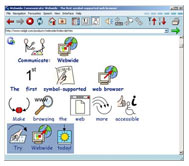
From the AT TechNET @ VCU: Assistive Technology Blog, a link to Communicate: Webwide, the first symbol-supported web browser. Everything happens in the browser where you can view pages in normal view, with plain text or using symbols. Their icon library contains over 29,000 words. It also reads any text that you highlight.
Is this type of technology the answer for some users with cognitive disabilities? What about a potential user who can’t access your material even when you have gone great lengths to simplify your writing. Also, while individual sites may provide their own visual elements to represent different ideas, is their value is having a standard set of icons? Perhaps the ideas would be to allow users to associate symbols with the words themselves, or at least have the option to override the default icon.
Communicate: Webwide is provided on a subscription model and is PC-only (30-day demo available).
Does it work with any site? Probably not, from their guidelines:
While Webwide interprets clear, well-written HTML; some layouts and styles will be more effective than others. To this end, we will be producing guidelines for web designers who would like to make their information accessible through Webwide.
Hopefully their guidelines are in line with already established web standards and guidelines.

[…] read aloud may be helpful in some situations, but what about a graphical representation of content? There are already some efforts in this area with the Communicate: Webwide symbol supported browser that claims to be able to represent over […]
[…] have mentioned a symbol-based browser before, but here is a list of three different accessible […]