Disability Perspective

A “man on crutches” is sharing the experience of just one small part of his day affected by his disability, getting a seat on the bus in the seats reserved for riders with disabilities. He has done an excellent job of conveying his experience and perspective through images:

People Who Sit In The Disability Seats When I’m Standing On My Crutches

The Promise of Accessible Readability

Guideline 3.1 of the WCAG 2.0 states “Make text content readable and understandable.”. There are lots of ways to measure readability, but today I came across an example (Thanks Jeff) of what might be referred to as ‘extreme readability’.

Tar Heel Reader is a collaboration between the Center for Literacy and Disability Studies and the Computer Science Department at University of North Carolina at Chapel Hill. It is a collection of over 3000 online books in an extremely online readable format. From the site:

Each book can be speech enabled and accessed using multiple interfaces (i.e. switches, alternative keyboards, touch screens, and dedicated AAC devices). The books may be downloaded as slide shows in PowerPoint, Impress, or Flash format.

A high school student with an intellectual disability may have difficulty finding age-appropriate reading material if he reads at 1st grade reading level. Enter Tar Heal Reader, not only is the text extremely readable, but it is also accessible in a number of different ways.

Go check out some of the books or even write your own.


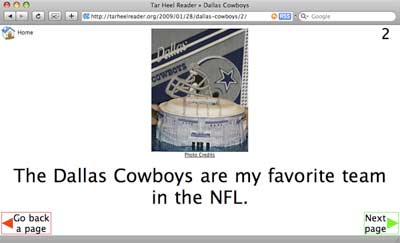
screenshot of a online book on the Dallas Cowboys

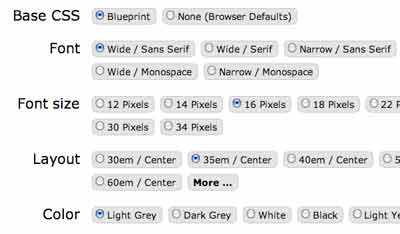
Each of the books listed on the Tar Heels site was created one at a time, a model that doesn’t scale very well. At the other end of the spectrum is Readable (or Readability). Readable allows a user to take one aspect of readability (formatting of text) and apply it to any website.


screenshot with options on formatting text

Imagine now a tool that could take any paragraph (Like Readable) and converts that paragraph into some type of text or multimedia that is understandable to any user, at whatever level of understanding that user specifies. Cool.

What other projects or efforts are laying the groundwork for this type of accessibility to exist one day?

Additional resources on making your content more accessible to users with disabilities

See the Person, Not the Disability

Great video I came across at walking . is . overrated:

In his post titled, Some Sweet Disability Thinking, Red references a post from Mark Smith:

If you told me of all of the complications of your disability – physically, emotionally, mentally, socially, economically – and I simply replied, “So what?” would you be offended?

In fact, I give this very response to my friends – and, more importantly, myself – every day when it comes to the challenges of living with disability: You and I have disability hardships, so what?

Read the rest from Mark Smith’s post titled Three Pages in the Trash.

“So what?”

Never Leave Home Without a Spider-Man Costume

This is a great story from Thailand where a student with autism had a panic attack and climbed onto the ledge outside of his third floor classroom. It was the student’s first day at a new school and no one was able to convince him to come back inside, so the local fire department was called.

Fireman Somchai Yoosabai shows up and hears that the student loves comic book heroes. It just so happens that Somchai hasa Spider-Man costume that he keeps in his locker. He puts costume on and quickly and safely convinces the student to come back inside.

More at:

Access Means Different Things to Different People

“‘Access’ isn’t just yes or no, but really shades of accessibility, and has different dimesions.” (Access to Open Educational Resources Wiki)

The definition of access from Merriam-Webster:

a: permission, liberty, or ability to enter, approach, or pass to and from a place or to approach or communicate with a person or thing b: freedom or ability to obtain or make use of something c: a way or means of access d: the act or an instance of accessing

Depending on who you are or where you are at in life, the word access has different meanings. UNESCO has a fantastic wiki page on Access to Open Educational Resources where they define a number of different types of access. Although written for a specific type of content (open educational resources), the types of access they have identified can be applied generally :

  • Awareness, Policy, Attitude, Cultural:
    • Access in terms of awareness.
    • Access in terms of local policy/attitude.
    • Access in terms of languages.
  • Legal
    • Access in terms of licensing.
  • Technical (Delivery Method)
    • Access in terms of file formats.
    • Access in terms of disability.
  • Technical (Receiving)
    • Access in terms of infrastructure.
    • Access in terms of internet connectivity/bandwidth.
    • Access in terms of discovery.
    • Access in terms of ability and skills.

Reading through the comments on the page, it is evident that in many parts of the world, access for users with disabilities is a secondary concern (at best). Without power, bandwidth or an even an Internet connnection no content cannot be accessed, so who care if is it accessible to users with disabilities?

When considering all of the different barriers that keep people from accessing content on the Internet, all of the sudden adding alternative text to an image doesn’t feel like such a big deal. Let’s keep working on an accessible web, but in the meantime let’s not forget that lots of people don’t have access to that content whether it is “accessible” or not.

Via Stephen Downes

Also of Interest

Web Accessibility vs Life Accessibility

After lacking the motivation to write a post for almost a year, I was finally able to admit that I don’t care about web accessibility as much as I thought I did. If you are looking for good, current information on web accessibility issues there is a long list of people who you should follow before Curb Cut.

That said, I care very much about disability issues. Curb Cut has been an accessibility blog written primarily for readers already interested in accessibility issues. However, depending on your past experience you may or may not give a crap about disability issues.

My interest in web accessibility originated from my relationships with two of my brothers who were born with Down syndrome. Like a good brother should, I wanted to make the web a friendlier place for them. Well, it turns out that Patrick has no use for the Internet. Dallin Paul is a heavy Internet user, but thus far has been able to find every America’s Funniest Home Video People Getting Hurt Collection and Power Ranger video on YouTube without any problem. If my goal is really to make the world a better place for them then it is time to refocus my efforts. There is little I could to for the Internet that would make it more useful to Patrick or Dallin Paul, but consider the following:

  • Patrick has worked for over 10 years at a University food court. He works hard, is dependable and well-liked by colleagues and customers. Nevertheless, there is very little chance that he will be offered a full-time position or any kind of benefits.
  • Dallin Paul still has a fear of attending church with my family because of some very unfortunate experiences he had with Sunday school teachers growing up. When he does attend, he is welcomed by some, tolerated by others and ignored by everyone else.

I have spent a number of years as a teacher in special ed classrooms, traveling with Special Olympics teams and volunteering with various disability organizations. You wouldn’t know any of that from reading Curb Cut in the past. My disability experience is the only real value I have to offer and I purposefully kept it out of my writing on web accessibility. Shame on me.

Here’s to a more authentic Curb Cut.

The Necessity of an Accessibility Checklist?

Aaron Cannon at NorthTemple shares an accessibility list he created in a post titled The Accessibility Checklist I Vowed I’d Never Write.

From Aaron:

When I wrote the below checklist, I attempted to answer the question, “What concise pieces of advice can I give to designers that will have the greatest impact on accessibility in the majority of cases?”

Other Checklists

Avoiding the Gray Areas

I just caught the last of Shawn Henry’s SXSW panel. Key takeway– there are white areas of things that are good to do for accessibility and black areas of things that are bad for accessibility– avoid worrying about the gray area in the middle. She mentioned the ability of web accessibility experts to endlessly debate the ins and outs of alt text. For example:

These discussions are helpful and essential for establishing best practices. However, these discussions are harmful to the extent that a developer becomes tied up arguing about “gray areas” instead of building accessible content.

SXSW Accessibility Panels

I’m headed to Austin tomorrow, here is a list of some of the presentations specifically on accessibility:

In addition there are sessions on internationalization, web standards and the ongoing browser wars. Audio from each of the sessions will be recorded and at some point made available on the website.

Any sessions that I missed? I hope to see some of you there, you can get in touch with me here.

Social Networking Accessibility

Via Accesssites.org, a summary of a 21 page report on the accessibility of social networks from AbilityNet. The report analyzes Facebook, MySpace, YouTube, Yahoo and Bebo and reports that they all stink. Of those 5 sites, Yahoo was the only was to receive a two-star rating– that’s two starts out of five. The other four all received one star indicating they are ‘very inaccessible’.

The Dataportability.org group has been in the news of late as a number of major social networks have become involved. While their stated mission is not to make social networks accessible for users with disabilities, the goal that they are working towards should have that overall effect over time. They are working to promote the use of existing open standards to facilitate the sharing of social network user content outside of that network. Over time this will open the door to the creation of more accessible interfaces to access at least some of the data that is currently available only through proprietary, inaccessible systems.

Hopefully, the process of making user content more readily available will also lead to improvements in accessibility along the way. In the meantime, are users with disabilities being left out of the social networking revolution? Is anyone doing this right?